Mapping Manager is the core of erwin Data Intelligence (erwin DI), where you do the following:
- Source to target mappings using the Metadata Tree View
- Associate crosswalks to mappings using the Code Mapping Catalog
- Associate reference data to mappings using the Reference Table Catalog
- Associate requirements to mappings using the Specification Artifact Catalog
- Create new mapping versions
- Specify test cases
Once mappings are approved for coding, ETL developers can export them as coding requirements. They can also export the mappings to XML and automatically generate ETL/ELT jobs for ETL tools, such as Informatica PowerCenter, IBM DataStage, Microsoft SQL Server SSIS, and so on.
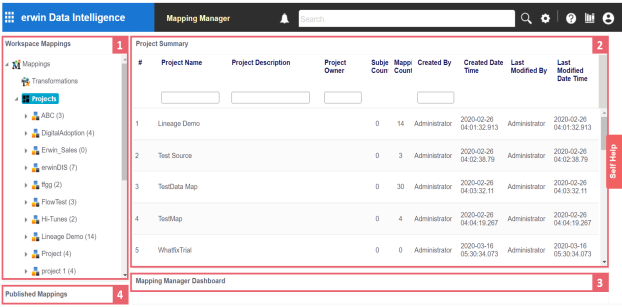
To access the Mapping Manager, go to Application Menu > Data Catalog > Mapping Manager. The Mapping Manager dashboard appears:
|
UI Section |
Function |
|---|---|
|
1-Workspace Mappings |
Use this pane to browse and work on projects and mappings. |
|
2-Central Pane |
Use this pane to view or work on the data based on your selection in the browser pane. |
|
3-Mapping Manager Dashboard |
Use this pane to view statistics re lated to mappings and projects. |
|
4-Published Mappings |
Use this pane to view and export details of published mappings. |
Managing mappings involves the following:
|
Copyright © 2026 Quest Software Inc. |